
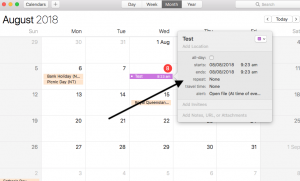
Set and forget backups On Mac For more tips and how-to’s, visit our tech blog Creating an automated (Scheduled) Mac backup without using Time Machine – Step by step guide.1. Launch Automator from the Applications menu (Shit+Command/Windows+A).2. Double click “Calendar Alarm”.3. Type “Get Specified Finder Items” into the variables field…
Search Results for:
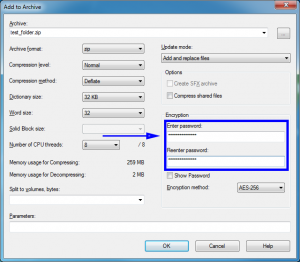
Encrypt Anything! For more tips and how-to’s, visit our tech blog 7-Zip is a free (even for commercial use) archiving tool for Windows with the ability to encrypt files with a password. It’s an alternative to commercial software like Winzip or Winrar. An encrypted file can’t be opened or decoded…

When your computer Won’t boot For more general troubleshooting articles, click here Often your computer is trying to boot up from some external piece of hardware. To test if this is the case, start by removing CDs or – God forbid – floppy disks from the computer. You’ll also want…
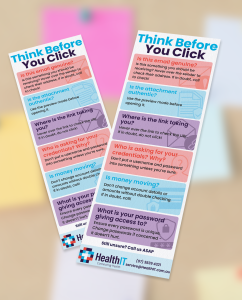
Printable safety cards Download and print email safety cards to pin up around your practice.The tips listed are a great start to keep safe from email scams. If you’re ever concerned about email security, contact us.It’s important to have IT security information accessible and inform team members. This is because…

Essential Eight Explained “As we’ve come to realise, the idea that security starts and ends with the purchase of a prepackaged firewall is simply misguided.”– Art Wittmann, Content Director at NetSuite IntroductionThe Strategies to Mitigate Cyber Security Incidents is a prioritised list of mitigation strategies to assist organisations in protecting…

Support for Windows 7 has ended All good things must come to an end, even Windows 7. After January 14, 2020, Microsoft is no longer providing security updates or support for PCs running Windows 7. But you can keep the good times rolling by moving to Windows 10.Click here to…

Managed Backup Backup the essentials, or a whole server Your data is important! You rely on your data for business continuity, patient care, and meeting your legal obligations to retain your patients’ medical history (for 7 years or up to the age of 25 for patients under 18).Therefore, backing up…

Health IT Tech Blog News & Cybersecurity tips New Stories Backup Backups and Disaster Recovery Health IT Backups are designed to meet standards. The RACGP Accreditation Standard v5 – this is the standard Australian General Practice accredits to. The Essential Eight – published by the Australian Government, these are recommended mitigation strategies…

Backup, VirtualBox, what else? Improving performance of the Virtual Machine using this tip This post is 6 years old. Keep in mind IT is a rapidly evolving industry, and this information may be outdated. Contact Us for more info. When virtualising a Datto backup, the system has already had Virtualbox…

Tyro ports and your POS system Telnet, Tyro, Terminals, oh my! This post is 6 years old. Keep in mind IT is a rapidly evolving industry, and this information may be outdated. Contact Us for more info. You should get a response from the following:telnet merchant.tyro.com 80telnet merchant.tyro.com 443telnet terminaldownloads.tyro.com…